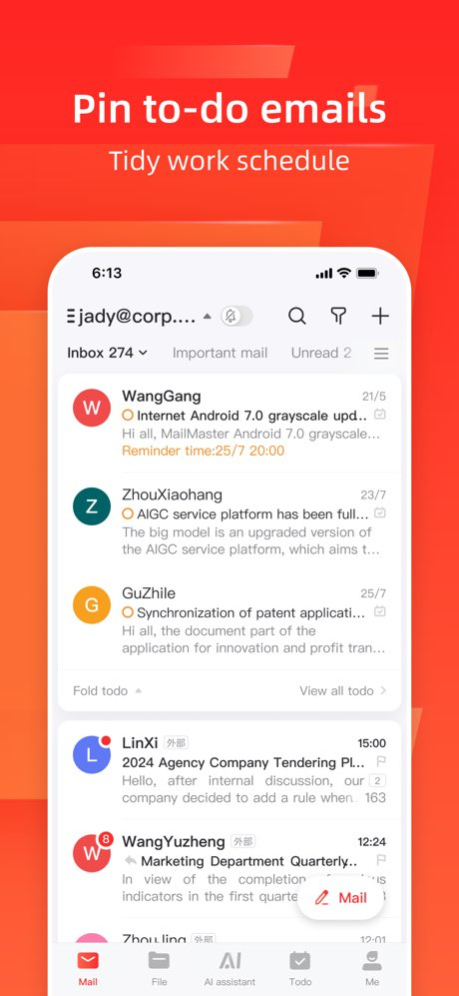
About Mail Master by NetEase
Mail Master by NetEase 7.0, the official client of NetEase Mail, has 29 years of technology and service accumulation, making it easier to use mail. 【Use One App To Manage Different Accounts】 - Support adding mainstream...
Mail Master by NetEase 7.0, the official client of NetEase Mail, has 29 years of technology and service accumulation, making it easier to use mail. 【Use One App To Manage Different Accounts】 - Support adding mainstream personal and business mailboxes such as NetEase, QQ, Outlook, etc.; - Supports aggregated folders such as all inboxes, and letters from different mailboxes are clear at a glance; 【Support All Platforms】 - Give you a great email experience whether it's a phone, Windows or Mac. - Log in to the master account, synchronize data on multiple terminals, and experience the same experience on different devices 【Reading letters more comfortable】 - support dark mode, - Support font size setting, you can adjust the text size to suit you; - Conversation aggregation to make email conversations clearer; 【Document Center】 - Quickly view recent attachments, and local management of attachment downloads is not interrupted; - Master Space supports uploading a single attachment of up to 3G, and sending large attachments at will; 【Email translation】 - One-click translation of emails, supporting English, French, Japanese, Korean and other multi-language emails to Chinese; 【@recipient】 - Write a letter to support @ recipient, task reminder is more clear; 【Scan to log in to the web page】 - Exclusive service for NetEase mailbox users, mailbox login is faster and safer. ---------- [ Monthly NetEaseMail Plus service for 200G] - Subscription period: one month - Subscription price: 30 yuan per month [ Yearly NetEaseMail Plus service for 200G ] - Subscription period: one year - Subscription price: 258 yuan per year [ Monthly NetEaseMail Plus service for 50G] - Subscription period: one month - Subscription price: 20 yuan per month [ Yearly NetEaseMail Plus service for 50G] - Subscription period: one year - Subscription price: 148 yuan per year [ Monthly Master Premium service ] - Subscription period: one month - Subscription price: 12 yuan per month [ Yearly Master Premium service] - Subscription period: one year - Subscription price: 88 yuan per year [ Monthly Master Benefit Package service ] - Subscription period: one month - Subscription price: 10 yuan per month [ Yearly Master Benefit Package service ] - Subscription period: one year - Subscription price: 88 yuan per year [ MailMater monthly ad-free service] - Subscription period: one month - Subscription price: 8 yuan per month [ MailMaster yearly ad-free service] - Subscription period: one year - Subscription price: 68 yuan per year -Payment: When user confirms the purchase, the cost will be paied through users' iTunes account. - Cancel renewal: To cancel a subscription, please manually turn off automatic renewal service in [Settings]--[Apple ID, iCloud, iTunes & App Store] --[Subscription] within 24 hours before the current subscription expiration. - Renewal: Payment will be deducted through apple's iTunes account within 24 hours before expiration, and the subscription period will be extended for one month when successful deduction. - Privacy Policy: https://reg.163.com/agreement_mobile_ysbh_wap.shtml?v=20171127 - Terms of Netease Mail Privilege Service: https://mail.163.com/html/notice/2019/notice_privilege.htm?isBackToApp=true - Terms of Mail Master Privilege Service: https://maas.mail.163.com/dashi-web-extend/html/master_privilege_service.html ---------- For usage problems, you can go to the help center to read problem solutions: http://mail.163.com/dashi/help.html For account questions and product suggestions, you can send an email to dashiteam@163.com. Thanks for your support to Mail Master by NetEase.
Version History 1. New: Support setting signature according to write/reply/forward; 2. Fixed known issues and improved stability. 7.26.2 Sep 21 1. New: Added voice-to-text conversion. 2. Fixed other known issues to enhance stability. 7.26.1 Sep 9 1. New: Quick text for sending emails; 2. New: Support setting mail filter; 3. Optimized the interface display of the quick reply page; 4. Fixed other known issues to enhance stability. 7.25.21 Aug 17 1. NetEase Mail can display email usage data. 2. The reading page operation supports showing the operation name. 3. It supports selecting the language for the prefix of reply and forwarding. 4. It supports displaying detailed error information when attachment download fails. 5. The email tracking display of NetEase Enterprise Mail has been optimized. 6. Fix other known issues and enhance stability. 7.25.20 Jul 30 1. NetEase Mail can display email usage data. 2. The reading page operation supports showing the operation name. 3. It supports selecting the language for the prefix of reply and forwarding. 4. It supports displaying detailed error information when attachment download fails. 5. The email tracking display of NetEase Enterprise Mail has been optimized. 6. Fix other known issues and enhance stability. 7.25.18 Jul 16 1. The list now enables attachment-based email location. 2. Quick reply now supports inputting more text content. 3. Fixed other known issues and improved stability. 7.25.17 Jun 26 1. The list now enables attachment-based email location. 2. Quick reply now supports inputting more text content. 3. Fixed other known issues and improved stability. 7.25.16 Jun 23 1. Support tagging and categorizing sent emails. 2. Enable multi-select to mark items as to-do. 3. Fixed other known issues and enhanced stability. 7.25.13 May 29 Cross-border store management has been launched, and a new risk red-green light system has been added. When receiving a store risk email, a red light will be displayed to alert you, allowing you to quickly identify which emails require attention. Selecting "Cross-border Version" for email industry services will enable this feature. More updates: 1. Important emails support WeChat/SMS alerts; 2. Email sharing supports quick sharing of sent emails; 3. Optimized full-read style; 4. Prefix styles for reply and forwarding are optimized; 5. Fixed startup page freezing and crashing issues; 6. Fix other known issues and enhance stability. 7.25.12 May 11 Cross-border store management has been launched, and a new risk red-green light system has been added. When receiving a store risk email, a red light will be displayed to alert you, allowing you to quickly identify which emails require attention. Selecting "Cross-border Version" for email industry services will enable this feature. More updates: 1. Important emails support WeChat/SMS alerts; 2. Email sharing supports quick sharing of sent emails; 3. Optimized full-read style; 4. Prefix styles for reply and forwarding are optimized; 5. Fix known issues and enhance stability. 7.25.11 May 11 Cross-border store management has been launched, and a new risk red-green light system has been added. When receiving a store risk email, a red light will be displayed to alert you, allowing you to quickly identify which emails require attention. Selecting "Cross-border Version" for email industry services will enable this feature. More updates: 1. Important emails support WeChat/SMS alerts; 2. Email sharing supports quick sharing of sent emails; 3. Supports marking multiple emails as to-do; 4. Optimized full-read style; 5. Prefix styles for reply and forwarding are optimized; 6. Fix known issues and enhance stability. 7.25.10 May 6 1. Translation optimization: Added AI translation model, supporting more languages, automatic translation and immersive viewing. 2. NetEase Mail supports decryption and viewing of encrypted emails. 3. NetEase Enterprise Mail supports public account message push. 4. System tags can be hidden. 5. Fixed known issues and improved stability. 7.25.9 Apr 20 1. Translation optimization: Added AI translation model, supporting more languages, automatic translation and immersive viewing. 2. NetEase Mail supports decryption and viewing of encrypted emails. 3. NetEase Enterprise Mail supports public account message push. 4. System tags can be hidden. 5. Fixed known issues and improved stability. 7.25.8 Apr 17 1. Translation optimization: Added AI translation model, supporting more languages, automatic translation and immersive viewing. 2. NetEase Mail supports decryption and viewing of encrypted emails. 3. Fixed missing spaces in signatures for NetEase Enterprise Mail. 4. NetEase Enterprise Mail supports public account message push. 5. System tags can be hidden. 6. Fixed known issues and improved stability. 7.25.7 Apr 7 Fix known issues and enhance stability. 7.25.6 Mar 11 Fix known issues and enhance stability. 7.25.5 Mar 9 The launch page supports custom settings. 7.25.3 Feb 12 The launch page supports custom settings. 7.25.2 Feb 10 The launch page supports custom settings. 7.25.1 Feb 9 The "Lucky Tree" themed skin is now available. We wish you good fortune and success in the New Year. More updates: 1. Added "Timeline Mode" to the mail list, making it easier to view and manage mails by time. 2. Cross-border users can enable secondary reminders for important emails to avoid missing them; 3. Optimized display of meeting invitation notes; 4. Optimized Outlook calendar synchronization; 5. Fixed other known issues and improved stability. 7.24.14 Feb 2 The "Lucky Tree" themed skin is now available. We wish you good fortune and success in the New Year. More updates: 1. Support custom setting of tag colors; 2. Support setting "unclassified" list priority; 3. Optimization of email list time display; 4. Fix other known issues to enhance stability. 7.24.12 Jan 9 The "Lucky Tree" themed skin is now available. We wish you good fortune and success in the New Year. More updates: 1. Support custom setting of tag colors; 2. Support setting "unclassified" list priority; 3. Optimization of email list time display; 4. Fix other known issues to enhance stability. 7.24.11 Jan 5 The "Lucky Tree" themed skin is now available. We wish you good fortune and success in the New Year. More updates: 1. Support custom setting of tag colors; 2. Support setting "unclassified" list priority; 3. Optimization of email list time display; 4. Fix other known issues to enhance stability. 7.24.10 12/31/2025 1. Add unread widgets and view important emails faster. 2. Fix other known issues to enhance stability. 7.24.9 12/19/2025 1. Add unread widgets and view important emails faster. 2. Fix other known issues to enhance stability. 7.24.8 11/28/2025
Previous Versions
Here you can find the changelog of Mail Master by NetEase since it was posted on our website on 2016-09-23 10:30:03.
The latest version is 7.26.2 and it was updated on 2026-10-07 09:19:03. See below the changes in each version.
Mail Master by NetEase version 7.26.2
Updated At: 2026-10-06
Changes: Version History 1. New: Support setting signature according to write/reply/forward;
2. Fixed known issues and improved stability. 7.26.2 Sep 21 1. New: Added voice-to-text conversion.
2. Fixed other known issues to enhance stability. 7.26.1 Sep 9 1. New: Quick text for sending emails;
2. New: Support setting mail filter;
3. Optimized the interface display of the quick reply page;
4. Fixed other known issues to enhance stability. 7.25.21 Aug 17 1. NetEase Mail can display email usage data.
2. The reading page operation supports showing the operation name.
3. It supports selecting the language for the prefix of reply and forwarding.
4. It supports displaying detailed error information when attachment download fails.
5. The email tracking display of NetEase Enterprise Mail has been optimized.
6. Fix other known issues and enhance stability. 7.25.20 Jul 30 1. NetEase Mail can display email usage data.
2. The reading page operation supports showing the operation name.
3. It supports selecting the language for the prefix of reply and forwarding.
4. It supports displaying detailed error information when attachment download fails.
5. The email tracking display of NetEase Enterprise Mail has been optimized.
6. Fix other known issues and enhance stability. 7.25.18 Jul 16 1. The list now enables attachment-based email location.
2. Quick reply now supports inputting more text content.
3. Fixed other known issues and improved stability. 7.25.17 Jun 26 1. The list now enables attachment-based email location.
2. Quick reply now supports inputting more text content.
3. Fixed other known issues and improved stability. 7.25.16 Jun 23 1. Support tagging and categorizing sent emails.
2. Enable multi-select to mark items as to-do.
3. Fixed other known issues and enhanced stability. 7.25.13 May 29 Cross-border store management has been launched, and a new risk red-green light system has been added. When receiving a store risk email, a red light will be displayed to alert you, allowing you to quickly identify which emails require attention. Selecting "Cross-border Version" for email industry services will enable this feature.
More updates:
1. Important emails support WeChat/SMS alerts;
2. Email sharing supports quick sharing of sent emails;
3. Optimized full-read style;
4. Prefix styles for reply and forwarding are optimized;
5. Fixed startup page freezing and crashing issues;
6. Fix other known issues and enhance stability. 7.25.12 May 11 Cross-border store management has been launched, and a new risk red-green light system has been added. When receiving a store risk email, a red light will be displayed to alert you, allowing you to quickly identify which emails require attention. Selecting "Cross-border Version" for email industry services will enable this feature.
More updates:
1. Important emails support WeChat/SMS alerts;
2. Email sharing supports quick sharing of sent emails;
3. Optimized full-read style;
4. Prefix styles for reply and forwarding are optimized;
5. Fix known issues and enhance stability. 7.25.11 May 11 Cross-border store management has been launched, and a new risk red-green light system has been added. When receiving a store risk email, a red light will be displayed to alert you, allowing you to quickly identify which emails require attention. Selecting "Cross-border Version" for email industry services will enable this feature.
More updates:
1. Important emails support WeChat/SMS alerts;
2. Email sharing supports quick sharing of sent emails;
3. Supports marking multiple emails as to-do;
4. Optimized full-read style;
5. Prefix styles for reply and forwarding are optimized;
6. Fix known issues and enhance stability. 7.25.10 May 6 1. Translation optimization: Added AI translation model, supporting more languages, automatic translation and immersive viewing.
2. NetEase Mail supports decryption and viewing of encrypted emails.
3. NetEase Enterprise Mail supports public account message push.
4. System tags can be hidden.
5. Fixed known issues and improved stability. 7.25.9 Apr 20 1. Translation optimization: Added AI translation model, supporting more languages, automatic translation and immersive viewing.
2. NetEase Mail supports decryption and viewing of encrypted emails.
3. NetEase Enterprise Mail supports public account message push.
4. System tags can be hidden.
5. Fixed known issues and improved stability. 7.25.8 Apr 17 1. Translation optimization: Added AI translation model, supporting more languages, automatic translation and immersive viewing.
2. NetEase Mail supports decryption and viewing of encrypted emails.
3. Fixed missing spaces in signatures for NetEase Enterprise Mail.
4. NetEase Enterprise Mail supports public account message push.
5. System tags can be hidden.
6. Fixed known issues and improved stability. 7.25.7 Apr 7 Fix known issues and enhance stability. 7.25.6 Mar 11 Fix known issues and enhance stability. 7.25.5 Mar 9 The launch page supports custom settings. 7.25.3 Feb 12 The launch page supports custom settings. 7.25.2 Feb 10 The launch page supports custom settings. 7.25.1 Feb 9 The "Lucky Tree" themed skin is now available. We wish you good fortune and success in the New Year.
More updates:
1. Added "Timeline Mode" to the mail list, making it easier to view and manage mails by time.
2. Cross-border users can enable secondary reminders for important emails to avoid missing them;
3. Optimized display of meeting invitation notes;
4. Optimized Outlook calendar synchronization;
5. Fixed other known issues and improved stability. 7.24.14 Feb 2 The "Lucky Tree" themed skin is now available. We wish you good fortune and success in the New Year.
More updates:
1. Support custom setting of tag colors;
2. Support setting "unclassified" list priority;
3. Optimization of email list time display;
4. Fix other known issues to enhance stability. 7.24.12 Jan 9 The "Lucky Tree" themed skin is now available. We wish you good fortune and success in the New Year.
More updates:
1. Support custom setting of tag colors;
2. Support setting "unclassified" list priority;
3. Optimization of email list time display;
4. Fix other known issues to enhance stability. 7.24.11 Jan 5 The "Lucky Tree" themed skin is now available. We wish you good fortune and success in the New Year.
More updates:
1. Support custom setting of tag colors;
2. Support setting "unclassified" list priority;
3. Optimization of email list time display;
4. Fix other known issues to enhance stability. 7.24.10 12/31/2025 1. Add unread widgets and view important emails faster.
2. Fix other known issues to enhance stability. 7.24.9 12/19/2025 1. Add unread widgets and view important emails faster.
2. Fix other known issues to enhance stability. 7.24.8 11/28/2025
Mail Master by NetEase version 7.26.2
Updated At: 2026-09-26
Changes: Version History 1. New: Support setting signature according to write/reply/forward;
2. Fixed known issues and improved stability. 7.26.2 5d ago 1. New: Added voice-to-text conversion.
2. Fixed other known issues to enhance stability. 7.26.1 Sep 9 1. New: Quick text for sending emails;
2. New: Support setting mail filter;
3. Optimized the interface display of the quick reply page;
4. Fixed other known issues to enhance stability. 7.25.21 Aug 17 1. NetEase Mail can display email usage data.
2. The reading page operation supports showing the operation name.
3. It supports selecting the language for the prefix of reply and forwarding.
4. It supports displaying detailed error information when attachment download fails.
5. The email tracking display of NetEase Enterprise Mail has been optimized.
6. Fix other known issues and enhance stability. 7.25.20 Jul 30 1. NetEase Mail can display email usage data.
2. The reading page operation supports showing the operation name.
3. It supports selecting the language for the prefix of reply and forwarding.
4. It supports displaying detailed error information when attachment download fails.
5. The email tracking display of NetEase Enterprise Mail has been optimized.
6. Fix other known issues and enhance stability. 7.25.18 Jul 16 1. The list now enables attachment-based email location.
2. Quick reply now supports inputting more text content.
3. Fixed other known issues and improved stability. 7.25.17 Jun 26 1. The list now enables attachment-based email location.
2. Quick reply now supports inputting more text content.
3. Fixed other known issues and improved stability. 7.25.16 Jun 23 1. Support tagging and categorizing sent emails.
2. Enable multi-select to mark items as to-do.
3. Fixed other known issues and enhanced stability. 7.25.13 May 29 Cross-border store management has been launched, and a new risk red-green light system has been added. When receiving a store risk email, a red light will be displayed to alert you, allowing you to quickly identify which emails require attention. Selecting "Cross-border Version" for email industry services will enable this feature.
More updates:
1. Important emails support WeChat/SMS alerts;
2. Email sharing supports quick sharing of sent emails;
3. Optimized full-read style;
4. Prefix styles for reply and forwarding are optimized;
5. Fixed startup page freezing and crashing issues;
6. Fix other known issues and enhance stability. 7.25.12 May 11 Cross-border store management has been launched, and a new risk red-green light system has been added. When receiving a store risk email, a red light will be displayed to alert you, allowing you to quickly identify which emails require attention. Selecting "Cross-border Version" for email industry services will enable this feature.
More updates:
1. Important emails support WeChat/SMS alerts;
2. Email sharing supports quick sharing of sent emails;
3. Optimized full-read style;
4. Prefix styles for reply and forwarding are optimized;
5. Fix known issues and enhance stability. 7.25.11 May 11 Cross-border store management has been launched, and a new risk red-green light system has been added. When receiving a store risk email, a red light will be displayed to alert you, allowing you to quickly identify which emails require attention. Selecting "Cross-border Version" for email industry services will enable this feature.
More updates:
1. Important emails support WeChat/SMS alerts;
2. Email sharing supports quick sharing of sent emails;
3. Supports marking multiple emails as to-do;
4. Optimized full-read style;
5. Prefix styles for reply and forwarding are optimized;
6. Fix known issues and enhance stability. 7.25.10 May 6 1. Translation optimization: Added AI translation model, supporting more languages, automatic translation and immersive viewing.
2. NetEase Mail supports decryption and viewing of encrypted emails.
3. NetEase Enterprise Mail supports public account message push.
4. System tags can be hidden.
5. Fixed known issues and improved stability. 7.25.9 Apr 20 1. Translation optimization: Added AI translation model, supporting more languages, automatic translation and immersive viewing.
2. NetEase Mail supports decryption and viewing of encrypted emails.
3. NetEase Enterprise Mail supports public account message push.
4. System tags can be hidden.
5. Fixed known issues and improved stability. 7.25.8 Apr 17 1. Translation optimization: Added AI translation model, supporting more languages, automatic translation and immersive viewing.
2. NetEase Mail supports decryption and viewing of encrypted emails.
3. Fixed missing spaces in signatures for NetEase Enterprise Mail.
4. NetEase Enterprise Mail supports public account message push.
5. System tags can be hidden.
6. Fixed known issues and improved stability. 7.25.7 Apr 7 Fix known issues and enhance stability. 7.25.6 Mar 11 Fix known issues and enhance stability. 7.25.5 Mar 9 The launch page supports custom settings. 7.25.3 Feb 12 The launch page supports custom settings. 7.25.2 Feb 10 The launch page supports custom settings. 7.25.1 Feb 9 The "Lucky Tree" themed skin is now available. We wish you good fortune and success in the New Year.
More updates:
1. Added "Timeline Mode" to the mail list, making it easier to view and manage mails by time.
2. Cross-border users can enable secondary reminders for important emails to avoid missing them;
3. Optimized display of meeting invitation notes;
4. Optimized Outlook calendar synchronization;
5. Fixed other known issues and improved stability. 7.24.14 Feb 2 The "Lucky Tree" themed skin is now available. We wish you good fortune and success in the New Year.
More updates:
1. Support custom setting of tag colors;
2. Support setting "unclassified" list priority;
3. Optimization of email list time display;
4. Fix other known issues to enhance stability. 7.24.12 Jan 9 The "Lucky Tree" themed skin is now available. We wish you good fortune and success in the New Year.
More updates:
1. Support custom setting of tag colors;
2. Support setting "unclassified" list priority;
3. Optimization of email list time display;
4. Fix other known issues to enhance stability. 7.24.11 Jan 5 The "Lucky Tree" themed skin is now available. We wish you good fortune and success in the New Year.
More updates:
1. Support custom setting of tag colors;
2. Support setting "unclassified" list priority;
3. Optimization of email list time display;
4. Fix other known issues to enhance stability. 7.24.10 12/31/2025 1. Add unread widgets and view important emails faster.
2. Fix other known issues to enhance stability. 7.24.9 12/19/2025 1. Add unread widgets and view important emails faster.
2. Fix other known issues to enhance stability. 7.24.8 11/28/2025
Mail Master by NetEase version 7.26.1
Updated At: 2026-09-19
Changes: Version History 1. New: Added voice-to-text conversion.
2. Fixed other known issues to enhance stability. 7.26.1 Sep 9 1. New: Quick text for sending emails;
2. New: Support setting mail filter;
3. Optimized the interface display of the quick reply page;
4. Fixed other known issues to enhance stability. 7.25.21 Aug 17 1. NetEase Mail can display email usage data.
2. The reading page operation supports showing the operation name.
3. It supports selecting the language for the prefix of reply and forwarding.
4. It supports displaying detailed error information when attachment download fails.
5. The email tracking display of NetEase Enterprise Mail has been optimized.
6. Fix other known issues and enhance stability. 7.25.20 Jul 30 1. NetEase Mail can display email usage data.
2. The reading page operation supports showing the operation name.
3. It supports selecting the language for the prefix of reply and forwarding.
4. It supports displaying detailed error information when attachment download fails.
5. The email tracking display of NetEase Enterprise Mail has been optimized.
6. Fix other known issues and enhance stability. 7.25.18 Jul 16 1. The list now enables attachment-based email location.
2. Quick reply now supports inputting more text content.
3. Fixed other known issues and improved stability. 7.25.17 Jun 26 1. The list now enables attachment-based email location.
2. Quick reply now supports inputting more text content.
3. Fixed other known issues and improved stability. 7.25.16 Jun 23 1. Support tagging and categorizing sent emails.
2. Enable multi-select to mark items as to-do.
3. Fixed other known issues and enhanced stability. 7.25.13 May 29 Cross-border store management has been launched, and a new risk red-green light system has been added. When receiving a store risk email, a red light will be displayed to alert you, allowing you to quickly identify which emails require attention. Selecting "Cross-border Version" for email industry services will enable this feature.
More updates:
1. Important emails support WeChat/SMS alerts;
2. Email sharing supports quick sharing of sent emails;
3. Optimized full-read style;
4. Prefix styles for reply and forwarding are optimized;
5. Fixed startup page freezing and crashing issues;
6. Fix other known issues and enhance stability. 7.25.12 May 11 Cross-border store management has been launched, and a new risk red-green light system has been added. When receiving a store risk email, a red light will be displayed to alert you, allowing you to quickly identify which emails require attention. Selecting "Cross-border Version" for email industry services will enable this feature.
More updates:
1. Important emails support WeChat/SMS alerts;
2. Email sharing supports quick sharing of sent emails;
3. Optimized full-read style;
4. Prefix styles for reply and forwarding are optimized;
5. Fix known issues and enhance stability. 7.25.11 May 11 Cross-border store management has been launched, and a new risk red-green light system has been added. When receiving a store risk email, a red light will be displayed to alert you, allowing you to quickly identify which emails require attention. Selecting "Cross-border Version" for email industry services will enable this feature.
More updates:
1. Important emails support WeChat/SMS alerts;
2. Email sharing supports quick sharing of sent emails;
3. Supports marking multiple emails as to-do;
4. Optimized full-read style;
5. Prefix styles for reply and forwarding are optimized;
6. Fix known issues and enhance stability. 7.25.10 May 6 1. Translation optimization: Added AI translation model, supporting more languages, automatic translation and immersive viewing.
2. NetEase Mail supports decryption and viewing of encrypted emails.
3. NetEase Enterprise Mail supports public account message push.
4. System tags can be hidden.
5. Fixed known issues and improved stability. 7.25.9 Apr 20 1. Translation optimization: Added AI translation model, supporting more languages, automatic translation and immersive viewing.
2. NetEase Mail supports decryption and viewing of encrypted emails.
3. NetEase Enterprise Mail supports public account message push.
4. System tags can be hidden.
5. Fixed known issues and improved stability. 7.25.8 Apr 17 1. Translation optimization: Added AI translation model, supporting more languages, automatic translation and immersive viewing.
2. NetEase Mail supports decryption and viewing of encrypted emails.
3. Fixed missing spaces in signatures for NetEase Enterprise Mail.
4. NetEase Enterprise Mail supports public account message push.
5. System tags can be hidden.
6. Fixed known issues and improved stability. 7.25.7 Apr 7 Fix known issues and enhance stability. 7.25.6 Mar 11 Fix known issues and enhance stability. 7.25.5 Mar 9 The launch page supports custom settings. 7.25.3 Feb 12 The launch page supports custom settings. 7.25.2 Feb 10 The launch page supports custom settings. 7.25.1 Feb 9 The "Lucky Tree" themed skin is now available. We wish you good fortune and success in the New Year.
More updates:
1. Added "Timeline Mode" to the mail list, making it easier to view and manage mails by time.
2. Cross-border users can enable secondary reminders for important emails to avoid missing them;
3. Optimized display of meeting invitation notes;
4. Optimized Outlook calendar synchronization;
5. Fixed other known issues and improved stability. 7.24.14 Feb 2 The "Lucky Tree" themed skin is now available. We wish you good fortune and success in the New Year.
More updates:
1. Support custom setting of tag colors;
2. Support setting "unclassified" list priority;
3. Optimization of email list time display;
4. Fix other known issues to enhance stability. 7.24.12 Jan 9 The "Lucky Tree" themed skin is now available. We wish you good fortune and success in the New Year.
More updates:
1. Support custom setting of tag colors;
2. Support setting "unclassified" list priority;
3. Optimization of email list time display;
4. Fix other known issues to enhance stability. 7.24.11 Jan 5 The "Lucky Tree" themed skin is now available. We wish you good fortune and success in the New Year.
More updates:
1. Support custom setting of tag colors;
2. Support setting "unclassified" list priority;
3. Optimization of email list time display;
4. Fix other known issues to enhance stability. 7.24.10 12/31/2025 1. Add unread widgets and view important emails faster.
2. Fix other known issues to enhance stability. 7.24.9 12/19/2025 1. Add unread widgets and view important emails faster.
2. Fix other known issues to enhance stability. 7.24.8 11/28/2025 1. Supports batch adding notes to email addresses;
2. Displays the email addresses where emails are located in the all inbox list;
3. NetEase Enterprise Mail users can select files from "Enterprise Cloud Attachments" when composing emails;
4. Unread emails can display the folder where the emails are located;
5. Fixed other known issues and improved stability. 7.24.7 11/14/2025
Mail Master by NetEase version 7.26.1
Updated At: 2026-09-12
Changes: Version History 1. New: Added voice-to-text conversion.
2. Fixed other known issues to enhance stability. 7.26.1 2d ago 1. New: Quick text for sending emails;
2. New: Support setting mail filter;
3. Optimized the interface display of the quick reply page;
4. Fixed other known issues to enhance stability. 7.25.21 Aug 17 1. NetEase Mail can display email usage data.
2. The reading page operation supports showing the operation name.
3. It supports selecting the language for the prefix of reply and forwarding.
4. It supports displaying detailed error information when attachment download fails.
5. The email tracking display of NetEase Enterprise Mail has been optimized.
6. Fix other known issues and enhance stability. 7.25.20 Jul 30 1. NetEase Mail can display email usage data.
2. The reading page operation supports showing the operation name.
3. It supports selecting the language for the prefix of reply and forwarding.
4. It supports displaying detailed error information when attachment download fails.
5. The email tracking display of NetEase Enterprise Mail has been optimized.
6. Fix other known issues and enhance stability. 7.25.18 Jul 16 1. The list now enables attachment-based email location.
2. Quick reply now supports inputting more text content.
3. Fixed other known issues and improved stability. 7.25.17 Jun 26 1. The list now enables attachment-based email location.
2. Quick reply now supports inputting more text content.
3. Fixed other known issues and improved stability. 7.25.16 Jun 23 1. Support tagging and categorizing sent emails.
2. Enable multi-select to mark items as to-do.
3. Fixed other known issues and enhanced stability. 7.25.13 May 29 Cross-border store management has been launched, and a new risk red-green light system has been added. When receiving a store risk email, a red light will be displayed to alert you, allowing you to quickly identify which emails require attention. Selecting "Cross-border Version" for email industry services will enable this feature.
More updates:
1. Important emails support WeChat/SMS alerts;
2. Email sharing supports quick sharing of sent emails;
3. Optimized full-read style;
4. Prefix styles for reply and forwarding are optimized;
5. Fixed startup page freezing and crashing issues;
6. Fix other known issues and enhance stability. 7.25.12 May 11 Cross-border store management has been launched, and a new risk red-green light system has been added. When receiving a store risk email, a red light will be displayed to alert you, allowing you to quickly identify which emails require attention. Selecting "Cross-border Version" for email industry services will enable this feature.
More updates:
1. Important emails support WeChat/SMS alerts;
2. Email sharing supports quick sharing of sent emails;
3. Optimized full-read style;
4. Prefix styles for reply and forwarding are optimized;
5. Fix known issues and enhance stability. 7.25.11 May 11 Cross-border store management has been launched, and a new risk red-green light system has been added. When receiving a store risk email, a red light will be displayed to alert you, allowing you to quickly identify which emails require attention. Selecting "Cross-border Version" for email industry services will enable this feature.
More updates:
1. Important emails support WeChat/SMS alerts;
2. Email sharing supports quick sharing of sent emails;
3. Supports marking multiple emails as to-do;
4. Optimized full-read style;
5. Prefix styles for reply and forwarding are optimized;
6. Fix known issues and enhance stability. 7.25.10 May 6 1. Translation optimization: Added AI translation model, supporting more languages, automatic translation and immersive viewing.
2. NetEase Mail supports decryption and viewing of encrypted emails.
3. NetEase Enterprise Mail supports public account message push.
4. System tags can be hidden.
5. Fixed known issues and improved stability. 7.25.9 Apr 20 1. Translation optimization: Added AI translation model, supporting more languages, automatic translation and immersive viewing.
2. NetEase Mail supports decryption and viewing of encrypted emails.
3. NetEase Enterprise Mail supports public account message push.
4. System tags can be hidden.
5. Fixed known issues and improved stability. 7.25.8 Apr 17 1. Translation optimization: Added AI translation model, supporting more languages, automatic translation and immersive viewing.
2. NetEase Mail supports decryption and viewing of encrypted emails.
3. Fixed missing spaces in signatures for NetEase Enterprise Mail.
4. NetEase Enterprise Mail supports public account message push.
5. System tags can be hidden.
6. Fixed known issues and improved stability. 7.25.7 Apr 7 Fix known issues and enhance stability. 7.25.6 Mar 11 Fix known issues and enhance stability. 7.25.5 Mar 9 The launch page supports custom settings. 7.25.3 Feb 12 The launch page supports custom settings. 7.25.2 Feb 10 The launch page supports custom settings. 7.25.1 Feb 9 The "Lucky Tree" themed skin is now available. We wish you good fortune and success in the New Year.
More updates:
1. Added "Timeline Mode" to the mail list, making it easier to view and manage mails by time.
2. Cross-border users can enable secondary reminders for important emails to avoid missing them;
3. Optimized display of meeting invitation notes;
4. Optimized Outlook calendar synchronization;
5. Fixed other known issues and improved stability. 7.24.14 Feb 2 The "Lucky Tree" themed skin is now available. We wish you good fortune and success in the New Year.
More updates:
1. Support custom setting of tag colors;
2. Support setting "unclassified" list priority;
3. Optimization of email list time display;
4. Fix other known issues to enhance stability. 7.24.12 Jan 9 The "Lucky Tree" themed skin is now available. We wish you good fortune and success in the New Year.
More updates:
1. Support custom setting of tag colors;
2. Support setting "unclassified" list priority;
3. Optimization of email list time display;
4. Fix other known issues to enhance stability. 7.24.11 Jan 5 The "Lucky Tree" themed skin is now available. We wish you good fortune and success in the New Year.
More updates:
1. Support custom setting of tag colors;
2. Support setting "unclassified" list priority;
3. Optimization of email list time display;
4. Fix other known issues to enhance stability. 7.24.10 12/31/2025 1. Add unread widgets and view important emails faster.
2. Fix other known issues to enhance stability. 7.24.9 12/19/2025 1. Add unread widgets and view important emails faster.
2. Fix other known issues to enhance stability. 7.24.8 11/28/2025 1. Supports batch adding notes to email addresses;
2. Displays the email addresses where emails are located in the all inbox list;
3. NetEase Enterprise Mail users can select files from "Enterprise Cloud Attachments" when composing emails;
4. Unread emails can display the folder where the emails are located;
5. Fixed other known issues and improved stability. 7.24.7 11/14/2025
Mail Master by NetEase version 7.25.21
Updated At: 2026-09-05
Changes: Version History 1. New: Quick text for sending emails;
2. New: Support setting mail filter;
3. Optimized the interface display of the quick reply page;
4. Fixed other known issues to enhance stability. 7.25.21 Aug 17 1. NetEase Mail can display email usage data.
2. The reading page operation supports showing the operation name.
3. It supports selecting the language for the prefix of reply and forwarding.
4. It supports displaying detailed error information when attachment download fails.
5. The email tracking display of NetEase Enterprise Mail has been optimized.
6. Fix other known issues and enhance stability. 7.25.20 Jul 30 1. NetEase Mail can display email usage data.
2. The reading page operation supports showing the operation name.
3. It supports selecting the language for the prefix of reply and forwarding.
4. It supports displaying detailed error information when attachment download fails.
5. The email tracking display of NetEase Enterprise Mail has been optimized.
6. Fix other known issues and enhance stability. 7.25.18 Jul 16 1. The list now enables attachment-based email location.
2. Quick reply now supports inputting more text content.
3. Fixed other known issues and improved stability. 7.25.17 Jun 26 1. The list now enables attachment-based email location.
2. Quick reply now supports inputting more text content.
3. Fixed other known issues and improved stability. 7.25.16 Jun 23 1. Support tagging and categorizing sent emails.
2. Enable multi-select to mark items as to-do.
3. Fixed other known issues and enhanced stability. 7.25.13 May 29 Cross-border store management has been launched, and a new risk red-green light system has been added. When receiving a store risk email, a red light will be displayed to alert you, allowing you to quickly identify which emails require attention. Selecting "Cross-border Version" for email industry services will enable this feature.
More updates:
1. Important emails support WeChat/SMS alerts;
2. Email sharing supports quick sharing of sent emails;
3. Optimized full-read style;
4. Prefix styles for reply and forwarding are optimized;
5. Fixed startup page freezing and crashing issues;
6. Fix other known issues and enhance stability. 7.25.12 May 11 Cross-border store management has been launched, and a new risk red-green light system has been added. When receiving a store risk email, a red light will be displayed to alert you, allowing you to quickly identify which emails require attention. Selecting "Cross-border Version" for email industry services will enable this feature.
More updates:
1. Important emails support WeChat/SMS alerts;
2. Email sharing supports quick sharing of sent emails;
3. Optimized full-read style;
4. Prefix styles for reply and forwarding are optimized;
5. Fix known issues and enhance stability. 7.25.11 May 11 Cross-border store management has been launched, and a new risk red-green light system has been added. When receiving a store risk email, a red light will be displayed to alert you, allowing you to quickly identify which emails require attention. Selecting "Cross-border Version" for email industry services will enable this feature.
More updates:
1. Important emails support WeChat/SMS alerts;
2. Email sharing supports quick sharing of sent emails;
3. Supports marking multiple emails as to-do;
4. Optimized full-read style;
5. Prefix styles for reply and forwarding are optimized;
6. Fix known issues and enhance stability. 7.25.10 May 6 1. Translation optimization: Added AI translation model, supporting more languages, automatic translation and immersive viewing.
2. NetEase Mail supports decryption and viewing of encrypted emails.
3. NetEase Enterprise Mail supports public account message push.
4. System tags can be hidden.
5. Fixed known issues and improved stability. 7.25.9 Apr 20 1. Translation optimization: Added AI translation model, supporting more languages, automatic translation and immersive viewing.
2. NetEase Mail supports decryption and viewing of encrypted emails.
3. NetEase Enterprise Mail supports public account message push.
4. System tags can be hidden.
5. Fixed known issues and improved stability. 7.25.8 Apr 17 1. Translation optimization: Added AI translation model, supporting more languages, automatic translation and immersive viewing.
2. NetEase Mail supports decryption and viewing of encrypted emails.
3. Fixed missing spaces in signatures for NetEase Enterprise Mail.
4. NetEase Enterprise Mail supports public account message push.
5. System tags can be hidden.
6. Fixed known issues and improved stability. 7.25.7 Apr 7 Fix known issues and enhance stability. 7.25.6 Mar 11 Fix known issues and enhance stability. 7.25.5 Mar 9 The launch page supports custom settings. 7.25.3 Feb 12 The launch page supports custom settings. 7.25.2 Feb 10 The launch page supports custom settings. 7.25.1 Feb 9 The "Lucky Tree" themed skin is now available. We wish you good fortune and success in the New Year.
More updates:
1. Added "Timeline Mode" to the mail list, making it easier to view and manage mails by time.
2. Cross-border users can enable secondary reminders for important emails to avoid missing them;
3. Optimized display of meeting invitation notes;
4. Optimized Outlook calendar synchronization;
5. Fixed other known issues and improved stability. 7.24.14 Feb 2 The "Lucky Tree" themed skin is now available. We wish you good fortune and success in the New Year.
More updates:
1. Support custom setting of tag colors;
2. Support setting "unclassified" list priority;
3. Optimization of email list time display;
4. Fix other known issues to enhance stability. 7.24.12 Jan 9 The "Lucky Tree" themed skin is now available. We wish you good fortune and success in the New Year.
More updates:
1. Support custom setting of tag colors;
2. Support setting "unclassified" list priority;
3. Optimization of email list time display;
4. Fix other known issues to enhance stability. 7.24.11 Jan 5 The "Lucky Tree" themed skin is now available. We wish you good fortune and success in the New Year.
More updates:
1. Support custom setting of tag colors;
2. Support setting "unclassified" list priority;
3. Optimization of email list time display;
4. Fix other known issues to enhance stability. 7.24.10 12/31/2025 1. Add unread widgets and view important emails faster.
2. Fix other known issues to enhance stability. 7.24.9 12/19/2025 1. Add unread widgets and view important emails faster.
2. Fix other known issues to enhance stability. 7.24.8 11/28/2025 1. Supports batch adding notes to email addresses;
2. Displays the email addresses where emails are located in the all inbox list;
3. NetEase Enterprise Mail users can select files from "Enterprise Cloud Attachments" when composing emails;
4. Unread emails can display the folder where the emails are located;
5. Fixed other known issues and improved stability. 7.24.7 11/14/2025 1. Supports batch adding notes to email addresses;
2. Displays the email addresses where emails are located in the all inbox list;
3. NetEase Enterprise Mail users can select files from "Enterprise Cloud Attachments" when composing emails;
4. Unread emails can display the folder where the emails are located;
5. Fixed other known issues and improved stability. 7.24.6 10/31/2025
Mail Master by NetEase version 7.25.18
Updated At: 2026-07-23
Changes: Version History 1. NetEase Mail can display email usage data.
2. The reading page operation supports showing the operation name.
3. It supports selecting the language for the prefix of reply and forwarding.
4. It supports displaying detailed error information when attachment download fails.
5. The email tracking display of NetEase Enterprise Mail has been optimized.
6. Fix other known issues and enhance stability. 7.25.18 Jul 16 1. The list now enables attachment-based email location.
2. Quick reply now supports inputting more text content.
3. Fixed other known issues and improved stability. 7.25.17 Jun 26 1. The list now enables attachment-based email location.
2. Quick reply now supports inputting more text content.
3. Fixed other known issues and improved stability. 7.25.16 Jun 23 1. Support tagging and categorizing sent emails.
2. Enable multi-select to mark items as to-do.
3. Fixed other known issues and enhanced stability. 7.25.13 May 29 Cross-border store management has been launched, and a new risk red-green light system has been added. When receiving a store risk email, a red light will be displayed to alert you, allowing you to quickly identify which emails require attention. Selecting "Cross-border Version" for email industry services will enable this feature.
More updates:
1. Important emails support WeChat/SMS alerts;
2. Email sharing supports quick sharing of sent emails;
3. Optimized full-read style;
4. Prefix styles for reply and forwarding are optimized;
5. Fixed startup page freezing and crashing issues;
6. Fix other known issues and enhance stability. 7.25.12 May 11 Cross-border store management has been launched, and a new risk red-green light system has been added. When receiving a store risk email, a red light will be displayed to alert you, allowing you to quickly identify which emails require attention. Selecting "Cross-border Version" for email industry services will enable this feature.
More updates:
1. Important emails support WeChat/SMS alerts;
2. Email sharing supports quick sharing of sent emails;
3. Optimized full-read style;
4. Prefix styles for reply and forwarding are optimized;
5. Fix known issues and enhance stability. 7.25.11 May 11 Cross-border store management has been launched, and a new risk red-green light system has been added. When receiving a store risk email, a red light will be displayed to alert you, allowing you to quickly identify which emails require attention. Selecting "Cross-border Version" for email industry services will enable this feature.
More updates:
1. Important emails support WeChat/SMS alerts;
2. Email sharing supports quick sharing of sent emails;
3. Supports marking multiple emails as to-do;
4. Optimized full-read style;
5. Prefix styles for reply and forwarding are optimized;
6. Fix known issues and enhance stability. 7.25.10 May 6 1. Translation optimization: Added AI translation model, supporting more languages, automatic translation and immersive viewing.
2. NetEase Mail supports decryption and viewing of encrypted emails.
3. NetEase Enterprise Mail supports public account message push.
4. System tags can be hidden.
5. Fixed known issues and improved stability. 7.25.9 Apr 20 1. Translation optimization: Added AI translation model, supporting more languages, automatic translation and immersive viewing.
2. NetEase Mail supports decryption and viewing of encrypted emails.
3. NetEase Enterprise Mail supports public account message push.
4. System tags can be hidden.
5. Fixed known issues and improved stability. 7.25.8 Apr 17 1. Translation optimization: Added AI translation model, supporting more languages, automatic translation and immersive viewing.
2. NetEase Mail supports decryption and viewing of encrypted emails.
3. Fixed missing spaces in signatures for NetEase Enterprise Mail.
4. NetEase Enterprise Mail supports public account message push.
5. System tags can be hidden.
6. Fixed known issues and improved stability. 7.25.7 Apr 7 Fix known issues and enhance stability. 7.25.6 Mar 11 Fix known issues and enhance stability. 7.25.5 Mar 9 The launch page supports custom settings. 7.25.3 Feb 12 The launch page supports custom settings. 7.25.2 Feb 10 The launch page supports custom settings. 7.25.1 Feb 9 The "Lucky Tree" themed skin is now available. We wish you good fortune and success in the New Year.
More updates:
1. Added "Timeline Mode" to the mail list, making it easier to view and manage mails by time.
2. Cross-border users can enable secondary reminders for important emails to avoid missing them;
3. Optimized display of meeting invitation notes;
4. Optimized Outlook calendar synchronization;
5. Fixed other known issues and improved stability. 7.24.14 Feb 2 The "Lucky Tree" themed skin is now available. We wish you good fortune and success in the New Year.
More updates:
1. Support custom setting of tag colors;
2. Support setting "unclassified" list priority;
3. Optimization of email list time display;
4. Fix other known issues to enhance stability. 7.24.12 Jan 9 The "Lucky Tree" themed skin is now available. We wish you good fortune and success in the New Year.
More updates:
1. Support custom setting of tag colors;
2. Support setting "unclassified" list priority;
3. Optimization of email list time display;
4. Fix other known issues to enhance stability. 7.24.11 Jan 5 The "Lucky Tree" themed skin is now available. We wish you good fortune and success in the New Year.
More updates:
1. Support custom setting of tag colors;
2. Support setting "unclassified" list priority;
3. Optimization of email list time display;
4. Fix other known issues to enhance stability. 7.24.10 12/31/2025 1. Add unread widgets and view important emails faster.
2. Fix other known issues to enhance stability. 7.24.9 12/19/2025 1. Add unread widgets and view important emails faster.
2. Fix other known issues to enhance stability. 7.24.8 11/28/2025 1. Supports batch adding notes to email addresses;
2. Displays the email addresses where emails are located in the all inbox list;
3. NetEase Enterprise Mail users can select files from "Enterprise Cloud Attachments" when composing emails;
4. Unread emails can display the folder where the emails are located;
5. Fixed other known issues and improved stability. 7.24.7 11/14/2025 1. Supports batch adding notes to email addresses;
2. Displays the email addresses where emails are located in the all inbox list;
3. NetEase Enterprise Mail users can select files from "Enterprise Cloud Attachments" when composing emails;
4. Unread emails can display the folder where the emails are located;
5. Fixed other known issues and improved stability. 7.24.6 10/31/2025 1. New:Favorites now support permanent storage. Easily add files, images, and WeChat chat attachments to Favorites.
2. New:NetEase Enterprise Mail users can view their subordinate mails;
3. Fix other known issues to enhance stability.
Recent update:
1. NetEase Enterprise Mail users now support "Email Label", allowing them to synchronize labels from the web page and also add or edit labels.
2. Member rights update: Support "sender mode", all emails will be automatically aggregated by sender;
3. Fix other known issues to enhance stability. 7.24.5 10/09/2025 Fix other known issues to enhance stability.
Recent update:
1. NetEase Enterprise Mail users now support "Email Label", allowing them to synchronize labels from the web page and also add or edit labels.
2. Member rights update: Support "sender mode", all emails will be automatically aggregated by sender; 7.24.3 09/17/2025
Mail Master by NetEase version 7.25.17
Updated At: 2026-07-01
Changes: Version History 1. The list now enables attachment-based email location.
2. Quick reply now supports inputting more text content.
3. Fixed other known issues and improved stability. 7.25.17 5d ago 1. The list now enables attachment-based email location.
2. Quick reply now supports inputting more text content.
3. Fixed other known issues and improved stability. 7.25.16 Jun 23 1. Support tagging and categorizing sent emails.
2. Enable multi-select to mark items as to-do.
3. Fixed other known issues and enhanced stability. 7.25.13 May 29 Cross-border store management has been launched, and a new risk red-green light system has been added. When receiving a store risk email, a red light will be displayed to alert you, allowing you to quickly identify which emails require attention. Selecting "Cross-border Version" for email industry services will enable this feature.
More updates:
1. Important emails support WeChat/SMS alerts;
2. Email sharing supports quick sharing of sent emails;
3. Optimized full-read style;
4. Prefix styles for reply and forwarding are optimized;
5. Fixed startup page freezing and crashing issues;
6. Fix other known issues and enhance stability. 7.25.12 May 11 Cross-border store management has been launched, and a new risk red-green light system has been added. When receiving a store risk email, a red light will be displayed to alert you, allowing you to quickly identify which emails require attention. Selecting "Cross-border Version" for email industry services will enable this feature.
More updates:
1. Important emails support WeChat/SMS alerts;
2. Email sharing supports quick sharing of sent emails;
3. Optimized full-read style;
4. Prefix styles for reply and forwarding are optimized;
5. Fix known issues and enhance stability. 7.25.11 May 11 Cross-border store management has been launched, and a new risk red-green light system has been added. When receiving a store risk email, a red light will be displayed to alert you, allowing you to quickly identify which emails require attention. Selecting "Cross-border Version" for email industry services will enable this feature.
More updates:
1. Important emails support WeChat/SMS alerts;
2. Email sharing supports quick sharing of sent emails;
3. Supports marking multiple emails as to-do;
4. Optimized full-read style;
5. Prefix styles for reply and forwarding are optimized;
6. Fix known issues and enhance stability. 7.25.10 May 6 1. Translation optimization: Added AI translation model, supporting more languages, automatic translation and immersive viewing.
2. NetEase Mail supports decryption and viewing of encrypted emails.
3. NetEase Enterprise Mail supports public account message push.
4. System tags can be hidden.
5. Fixed known issues and improved stability. 7.25.9 Apr 20 1. Translation optimization: Added AI translation model, supporting more languages, automatic translation and immersive viewing.
2. NetEase Mail supports decryption and viewing of encrypted emails.
3. NetEase Enterprise Mail supports public account message push.
4. System tags can be hidden.
5. Fixed known issues and improved stability. 7.25.8 Apr 17 1. Translation optimization: Added AI translation model, supporting more languages, automatic translation and immersive viewing.
2. NetEase Mail supports decryption and viewing of encrypted emails.
3. Fixed missing spaces in signatures for NetEase Enterprise Mail.
4. NetEase Enterprise Mail supports public account message push.
5. System tags can be hidden.
6. Fixed known issues and improved stability. 7.25.7 Apr 7 Fix known issues and enhance stability. 7.25.6 Mar 11 Fix known issues and enhance stability. 7.25.5 Mar 9 The launch page supports custom settings. 7.25.3 Feb 12 The launch page supports custom settings. 7.25.2 Feb 10 The launch page supports custom settings. 7.25.1 Feb 9 The "Lucky Tree" themed skin is now available. We wish you good fortune and success in the New Year.
More updates:
1. Added "Timeline Mode" to the mail list, making it easier to view and manage mails by time.
2. Cross-border users can enable secondary reminders for important emails to avoid missing them;
3. Optimized display of meeting invitation notes;
4. Optimized Outlook calendar synchronization;
5. Fixed other known issues and improved stability. 7.24.14 Feb 2 The "Lucky Tree" themed skin is now available. We wish you good fortune and success in the New Year.
More updates:
1. Support custom setting of tag colors;
2. Support setting "unclassified" list priority;
3. Optimization of email list time display;
4. Fix other known issues to enhance stability. 7.24.12 Jan 9 The "Lucky Tree" themed skin is now available. We wish you good fortune and success in the New Year.
More updates:
1. Support custom setting of tag colors;
2. Support setting "unclassified" list priority;
3. Optimization of email list time display;
4. Fix other known issues to enhance stability. 7.24.11 Jan 5 The "Lucky Tree" themed skin is now available. We wish you good fortune and success in the New Year.
More updates:
1. Support custom setting of tag colors;
2. Support setting "unclassified" list priority;
3. Optimization of email list time display;
4. Fix other known issues to enhance stability. 7.24.10 12/31/2025 1. Add unread widgets and view important emails faster.
2. Fix other known issues to enhance stability. 7.24.9 12/19/2025 1. Add unread widgets and view important emails faster.
2. Fix other known issues to enhance stability. 7.24.8 11/28/2025 1. Supports batch adding notes to email addresses;
2. Displays the email addresses where emails are located in the all inbox list;
3. NetEase Enterprise Mail users can select files from "Enterprise Cloud Attachments" when composing emails;
4. Unread emails can display the folder where the emails are located;
5. Fixed other known issues and improved stability. 7.24.7 11/14/2025 1. Supports batch adding notes to email addresses;
2. Displays the email addresses where emails are located in the all inbox list;
3. NetEase Enterprise Mail users can select files from "Enterprise Cloud Attachments" when composing emails;
4. Unread emails can display the folder where the emails are located;
5. Fixed other known issues and improved stability. 7.24.6 10/31/2025 1. New:Favorites now support permanent storage. Easily add files, images, and WeChat chat attachments to Favorites.
2. New:NetEase Enterprise Mail users can view their subordinate mails;
3. Fix other known issues to enhance stability.
Recent update:
1. NetEase Enterprise Mail users now support "Email Label", allowing them to synchronize labels from the web page and also add or edit labels.
2. Member rights update: Support "sender mode", all emails will be automatically aggregated by sender;
3. Fix other known issues to enhance stability. 7.24.5 10/09/2025 Fix other known issues to enhance stability.
Recent update:
1. NetEase Enterprise Mail users now support "Email Label", allowing them to synchronize labels from the web page and also add or edit labels.
2. Member rights update: Support "sender mode", all emails will be automatically aggregated by sender; 7.24.3 09/17/2025 1. NetEase Enterprise Mail users now support "Email Label", allowing them to synchronize labels from the web page and also add or edit labels.
2. Member rights update: Support "sender mode", all emails will be automatically aggregated by sender;
3. Fix other known issues to enhance stability. 7.24.2 09/03/2025
Mail Master by NetEase version 7.25.13
Updated At: 2026-06-13
Changes: Version History 1. Support tagging and categorizing sent emails.
2. Enable multi-select to mark items as to-do.
3. Fixed other known issues and enhanced stability. 7.25.13 May 29 Cross-border store management has been launched, and a new risk red-green light system has been added. When receiving a store risk email, a red light will be displayed to alert you, allowing you to quickly identify which emails require attention. Selecting "Cross-border Version" for email industry services will enable this feature.
More updates:
1. Important emails support WeChat/SMS alerts;
2. Email sharing supports quick sharing of sent emails;
3. Optimized full-read style;
4. Prefix styles for reply and forwarding are optimized;
5. Fixed startup page freezing and crashing issues;
6. Fix other known issues and enhance stability. 7.25.12 May 11 Cross-border store management has been launched, and a new risk red-green light system has been added. When receiving a store risk email, a red light will be displayed to alert you, allowing you to quickly identify which emails require attention. Selecting "Cross-border Version" for email industry services will enable this feature.
More updates:
1. Important emails support WeChat/SMS alerts;
2. Email sharing supports quick sharing of sent emails;
3. Optimized full-read style;
4. Prefix styles for reply and forwarding are optimized;
5. Fix known issues and enhance stability. 7.25.11 May 11 Cross-border store management has been launched, and a new risk red-green light system has been added. When receiving a store risk email, a red light will be displayed to alert you, allowing you to quickly identify which emails require attention. Selecting "Cross-border Version" for email industry services will enable this feature.
More updates:
1. Important emails support WeChat/SMS alerts;
2. Email sharing supports quick sharing of sent emails;
3. Supports marking multiple emails as to-do;
4. Optimized full-read style;
5. Prefix styles for reply and forwarding are optimized;
6. Fix known issues and enhance stability. 7.25.10 May 6 1. Translation optimization: Added AI translation model, supporting more languages, automatic translation and immersive viewing.
2. NetEase Mail supports decryption and viewing of encrypted emails.
3. NetEase Enterprise Mail supports public account message push.
4. System tags can be hidden.
5. Fixed known issues and improved stability. 7.25.9 Apr 20 1. Translation optimization: Added AI translation model, supporting more languages, automatic translation and immersive viewing.
2. NetEase Mail supports decryption and viewing of encrypted emails.
3. NetEase Enterprise Mail supports public account message push.
4. System tags can be hidden.
5. Fixed known issues and improved stability. 7.25.8 Apr 17 1. Translation optimization: Added AI translation model, supporting more languages, automatic translation and immersive viewing.
2. NetEase Mail supports decryption and viewing of encrypted emails.
3. Fixed missing spaces in signatures for NetEase Enterprise Mail.
4. NetEase Enterprise Mail supports public account message push.
5. System tags can be hidden.
6. Fixed known issues and improved stability. 7.25.7 Apr 7 Fix known issues and enhance stability. 7.25.6 Mar 11 Fix known issues and enhance stability. 7.25.5 Mar 9 The launch page supports custom settings. 7.25.3 Feb 12 The launch page supports custom settings. 7.25.2 Feb 10 The launch page supports custom settings. 7.25.1 Feb 9 The "Lucky Tree" themed skin is now available. We wish you good fortune and success in the New Year.
More updates:
1. Added "Timeline Mode" to the mail list, making it easier to view and manage mails by time.
2. Cross-border users can enable secondary reminders for important emails to avoid missing them;
3. Optimized display of meeting invitation notes;
4. Optimized Outlook calendar synchronization;
5. Fixed other known issues and improved stability. 7.24.14 Feb 2 The "Lucky Tree" themed skin is now available. We wish you good fortune and success in the New Year.
More updates:
1. Support custom setting of tag colors;
2. Support setting "unclassified" list priority;
3. Optimization of email list time display;
4. Fix other known issues to enhance stability. 7.24.12 Jan 9 The "Lucky Tree" themed skin is now available. We wish you good fortune and success in the New Year.
More updates:
1. Support custom setting of tag colors;
2. Support setting "unclassified" list priority;
3. Optimization of email list time display;
4. Fix other known issues to enhance stability. 7.24.11 Jan 5 The "Lucky Tree" themed skin is now available. We wish you good fortune and success in the New Year.
More updates:
1. Support custom setting of tag colors;
2. Support setting "unclassified" list priority;
3. Optimization of email list time display;
4. Fix other known issues to enhance stability. 7.24.10 12/31/2025 1. Add unread widgets and view important emails faster.
2. Fix other known issues to enhance stability. 7.24.9 12/19/2025 1. Add unread widgets and view important emails faster.
2. Fix other known issues to enhance stability. 7.24.8 11/28/2025 1. Supports batch adding notes to email addresses;
2. Displays the email addresses where emails are located in the all inbox list;
3. NetEase Enterprise Mail users can select files from "Enterprise Cloud Attachments" when composing emails;
4. Unread emails can display the folder where the emails are located;
5. Fixed other known issues and improved stability. 7.24.7 11/14/2025 1. Supports batch adding notes to email addresses;
2. Displays the email addresses where emails are located in the all inbox list;
3. NetEase Enterprise Mail users can select files from "Enterprise Cloud Attachments" when composing emails;
4. Unread emails can display the folder where the emails are located;
5. Fixed other known issues and improved stability. 7.24.6 10/31/2025 1. New:Favorites now support permanent storage. Easily add files, images, and WeChat chat attachments to Favorites.
2. New:NetEase Enterprise Mail users can view their subordinate mails;
3. Fix other known issues to enhance stability.
Recent update:
1. NetEase Enterprise Mail users now support "Email Label", allowing them to synchronize labels from the web page and also add or edit labels.
2. Member rights update: Support "sender mode", all emails will be automatically aggregated by sender;
3. Fix other known issues to enhance stability. 7.24.5 10/09/2025 Fix other known issues to enhance stability.
Recent update:
1. NetEase Enterprise Mail users now support "Email Label", allowing them to synchronize labels from the web page and also add or edit labels.
2. Member rights update: Support "sender mode", all emails will be automatically aggregated by sender; 7.24.3 09/17/2025 1. NetEase Enterprise Mail users now support "Email Label", allowing them to synchronize labels from the web page and also add or edit labels.
2. Member rights update: Support "sender mode", all emails will be automatically aggregated by sender;
3. Fix other known issues to enhance stability. 7.24.2 09/03/2025 1. NetEase Enterprise Mail users now support "Email Label", allowing them to synchronize labels from the web page and also add or edit labels.
2. Member rights update: Support "sender mode", all emails will be automatically aggregated by sender;
3. Fix other known issues to enhance stability. 7.24.1 09/01/2025 NetEase Personal Mail now supports adding labels to emails.
Support for label groups: You can create "projects, schedules, priorities..." Each label group can create related labels.
The mailing list supports grouping by labels.
More updates:
1. When AI summarizes and analyzes emails, it can include the content of attachments.
2. Add command guidance after AI searches for attachments;
3. Fix other known issues to enhance stability. 7.23.5 08/04/2025
Mail Master by NetEase version 7.25.10
Updated At: 2026-05-10
Changes: Version History Cross-border store management has been launched, and a new risk red-green light system has been added. When receiving a store risk email, a red light will be displayed to alert you, allowing you to quickly identify which emails require attention. Selecting "Cross-border Version" for email industry services will enable this feature.
More updates:
1. Important emails support WeChat/SMS alerts;
2. Email sharing supports quick sharing of sent emails;
3. Supports marking multiple emails as to-do;
4. Optimized full-read style;
5. Prefix styles for reply and forwarding are optimized;
6. Fix known issues and enhance stability. 7.25.10 4d ago 1. Translation optimization: Added AI translation model, supporting more languages, automatic translation and immersive viewing.
2. NetEase Mail supports decryption and viewing of encrypted emails.
3. NetEase Enterprise Mail supports public account message push.
4. System tags can be hidden.
5. Fixed known issues and improved stability. 7.25.9 Apr 20 1. Translation optimization: Added AI translation model, supporting more languages, automatic translation and immersive viewing.
2. NetEase Mail supports decryption and viewing of encrypted emails.
3. NetEase Enterprise Mail supports public account message push.
4. System tags can be hidden.
5. Fixed known issues and improved stability. 7.25.8 Apr 17 1. Translation optimization: Added AI translation model, supporting more languages, automatic translation and immersive viewing.
2. NetEase Mail supports decryption and viewing of encrypted emails.
3. Fixed missing spaces in signatures for NetEase Enterprise Mail.
4. NetEase Enterprise Mail supports public account message push.
5. System tags can be hidden.
6. Fixed known issues and improved stability. 7.25.7 Apr 7 Fix known issues and enhance stability. 7.25.6 Mar 11 Fix known issues and enhance stability. 7.25.5 Mar 9 The launch page supports custom settings. 7.25.3 Feb 12 The launch page supports custom settings. 7.25.2 Feb 10 The launch page supports custom settings. 7.25.1 Feb 9 The "Lucky Tree" themed skin is now available. We wish you good fortune and success in the New Year.
More updates:
1. Added "Timeline Mode" to the mail list, making it easier to view and manage mails by time.
2. Cross-border users can enable secondary reminders for important emails to avoid missing them;
3. Optimized display of meeting invitation notes;
4. Optimized Outlook calendar synchronization;
5. Fixed other known issues and improved stability. 7.24.14 Feb 2 The "Lucky Tree" themed skin is now available. We wish you good fortune and success in the New Year.
More updates:
1. Support custom setting of tag colors;
2. Support setting "unclassified" list priority;
3. Optimization of email list time display;
4. Fix other known issues to enhance stability. 7.24.12 Jan 9 The "Lucky Tree" themed skin is now available. We wish you good fortune and success in the New Year.
More updates:
1. Support custom setting of tag colors;
2. Support setting "unclassified" list priority;
3. Optimization of email list time display;
4. Fix other known issues to enhance stability. 7.24.11 Jan 5 The "Lucky Tree" themed skin is now available. We wish you good fortune and success in the New Year.
More updates:
1. Support custom setting of tag colors;
2. Support setting "unclassified" list priority;
3. Optimization of email list time display;
4. Fix other known issues to enhance stability. 7.24.10 12/31/2025 1. Add unread widgets and view important emails faster.
2. Fix other known issues to enhance stability. 7.24.9 12/19/2025 1. Add unread widgets and view important emails faster.
2. Fix other known issues to enhance stability. 7.24.8 11/28/2025 1. Supports batch adding notes to email addresses;
2. Displays the email addresses where emails are located in the all inbox list;
3. NetEase Enterprise Mail users can select files from "Enterprise Cloud Attachments" when composing emails;
4. Unread emails can display the folder where the emails are located;
5. Fixed other known issues and improved stability. 7.24.7 11/14/2025 1. Supports batch adding notes to email addresses;
2. Displays the email addresses where emails are located in the all inbox list;
3. NetEase Enterprise Mail users can select files from "Enterprise Cloud Attachments" when composing emails;
4. Unread emails can display the folder where the emails are located;
5. Fixed other known issues and improved stability. 7.24.6 10/31/2025 1. New:Favorites now support permanent storage. Easily add files, images, and WeChat chat attachments to Favorites.
2. New:NetEase Enterprise Mail users can view their subordinate mails;
3. Fix other known issues to enhance stability.
Recent update:
1. NetEase Enterprise Mail users now support "Email Label", allowing them to synchronize labels from the web page and also add or edit labels.
2. Member rights update: Support "sender mode", all emails will be automatically aggregated by sender;
3. Fix other known issues to enhance stability. 7.24.5 10/09/2025 Fix other known issues to enhance stability.
Recent update:
1. NetEase Enterprise Mail users now support "Email Label", allowing them to synchronize labels from the web page and also add or edit labels.
2. Member rights update: Support "sender mode", all emails will be automatically aggregated by sender; 7.24.3 09/17/2025 1. NetEase Enterprise Mail users now support "Email Label", allowing them to synchronize labels from the web page and also add or edit labels.
2. Member rights update: Support "sender mode", all emails will be automatically aggregated by sender;
3. Fix other known issues to enhance stability. 7.24.2 09/03/2025 1. NetEase Enterprise Mail users now support "Email Label", allowing them to synchronize labels from the web page and also add or edit labels.
2. Member rights update: Support "sender mode", all emails will be automatically aggregated by sender;
3. Fix other known issues to enhance stability. 7.24.1 09/01/2025 NetEase Personal Mail now supports adding labels to emails.
Support for label groups: You can create "projects, schedules, priorities..." Each label group can create related labels.
The mailing list supports grouping by labels.
More updates:
1. When AI summarizes and analyzes emails, it can include the content of attachments.
2. Add command guidance after AI searches for attachments;
3. Fix other known issues to enhance stability. 7.23.5 08/04/2025 1. Support for aggregating emails by sender
2. Click the sender's avatar, you can quickly mark the sender, view the sender's information and emails;
3. Fix other known issues to enhance stability.
More updates:
1. "AI Email Organization" : The AI assistant can help you filter out key emails that need attention and delete spam emails.
2. The AI assistant supports optimization based on attachment names and conducts question-and-answer and summary.
3. Email translation optimization: Supports selection of the original language and automatic translation. 7.23.3 07/14/2025 1. "AI Email Organization" : The AI assistant can help you filter out key emails that need attention and delete spam emails.
2. The AI assistant supports optimization based on attachment names and conducts question-and-answer and summary.
3. Email translation optimization: Supports selection of the original language and automatic translation;
4. Fix other known issues to enhance stability. 7.23.2 06/30/2025 AI Assistant 2.0 has been upgraded: We bring you a brand-new open conversation experience.
1. Search emails through conversation: Find any email as easily as chatting.
2. Intelligent Q&A for emails: Supports question answering and analysis based on historical email content.
3. Convenient command operations: Complete email operations such as deletion and flagging with just one sentence.
More updates:
1. Add a new folder "All Recently Viewed"
2. Add new folders "All Deleted" and "All Spam"
3. Fix other known issues to enhance stability. 7.23.1 06/03/2025
Mail Master by NetEase version 4.13.2
Updated At: 2014-07-30
Disclaimer
Official App Store Link
We do not host Mail Master by NetEase on our servers. We did not scan it for viruses, adware, spyware or other type of malware. This app is hosted by Apple and passed their terms and conditions to be listed there. We recommend caution when installing it.
The App Store link for Mail Master by NetEase is provided to you by apps112.com without any warranties, representations or guarantees of any kind, so access it at your own risk.
If you have questions regarding this particular app contact the publisher directly. For questions about the functionalities of apps112.com contact us.